Choosing the Right Computer for Your Needs: A Comprehensive Guide
Navigating the Maze of Computer Options:
A Guide to Informed Decision-Making
Introduction:
In today's digital age, choosing the right computer is more important than ever. Whether you're a casual user, a business professional, or a hardcore gamer, the sheer variety of options available can be overwhelming. From performance specifications to budget constraints, there are numerous factors to consider when making this crucial decision. In this comprehensive guide, we'll walk you through the process of choosing the perfect computer for your needs, ensuring that you make an informed decision that meets both your current requirements and future aspirations.
Understanding Your Needs:
Before diving into the specifics of computer specifications, it's essential to identify your unique requirements. Consider the primary purpose of the computer—will you primarily use it for web browsing, office work, content creation, gaming, or a combination of these activities? Additionally, assess your budget and any specific features or capabilities that are non-negotiable for you.
Desktop vs. Laptop:
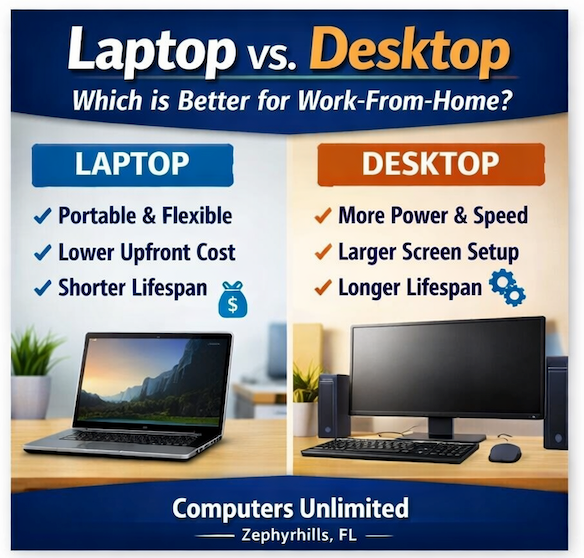
One of the first decisions you'll need to make is whether to invest in a desktop or a laptop computer. Desktops typically offer greater performance and upgradeability at a lower cost, making them ideal for power users and gamers. On the other hand, laptops provide portability and convenience, allowing you to work or play from anywhere. Consider your mobility needs and workspace constraints when choosing between these two options.
Performance Considerations:
Performance is a critical factor in determining the suitability of a computer for your needs. Key performance metrics to consider include:
- Processor (CPU): The CPU is the brain of your computer and plays a crucial role in its overall performance. Look for a processor with sufficient speed and cores to handle your workload efficiently.
- Memory (RAM): Adequate RAM ensures smooth multitasking and seamless performance, especially when running resource-intensive applications.
- Storage: Choose between traditional hard disk drives (HDDs) and solid-state drives (SSDs), with SSDs offering faster boot times and application loading speeds.
- Graphics: If you plan to use your computer for gaming or content creation, invest in a dedicated graphics card for optimal performance.
Budget Constraints:
Your budget will ultimately dictate the range of options available to you. Determine a realistic budget based on your needs and prioritize features accordingly. Keep in mind that while it's tempting to opt for the most affordable option, investing a little more upfront can result in a more future-proof and enjoyable computing experience.
Future-Proofing:
Technology is constantly evolving, so it's essential to future-proof your investment as much as possible. Look for computers with upgradeable components, such as additional RAM slots or expansion bays for additional storage. Additionally, consider investing in a computer with the latest connectivity options, such as USB-C ports and Wi-Fi 6 support, to ensure compatibility with future peripherals and networks.
Conclusion:
Choosing the right computer is a decision that shouldn't be taken lightly. By carefully considering your needs, budget, and future aspirations, you can make an informed decision that meets your requirements and provides a satisfying computing experience for years to come. At Computers Unlimited, we understand the challenges of selecting the perfect computer, and our knowledgeable team is here to assist you every step of the way. Visit us at 6220 Fort King Rd. Suite A, Zephyrhills, FL 33542, or give us a call at 813.783.3282 to learn more about our wide selection of computers and expert advice.
Make the right choice with Computers Unlimited—your trusted partner in computing excellence.
- Address: 6220 Fort King Rd. Suite A, Zephyrhills, FL 33542
- Phone: 813.783.3282